There seems to be a common misunderstanding about how session cookies usually work.
Closing the browser doesn’t necessarily clear out session cookies because the user can have the option of “Continue where you left off” enabled for Chrome startup. Folks usually enable this if they don’t want to lose their open tabs when Chrome closes, but Chrome also continues the session so session cookies could potentially persist indefinitely.
So if a user is having issues related to a site’s cookies, the most reliable solution is having them delete the cookies for this site. You can get to that fairly easily by clicking the settings icon on the left side of the address bar.
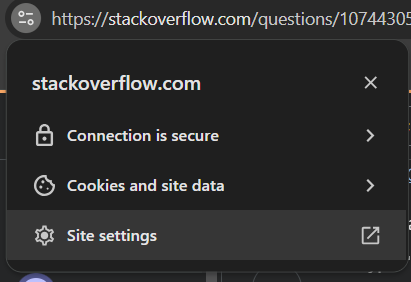
That takes them to the settings page with a button at the top to delete all the data for that specific site.
You can also copy/paste this in the address bar to go directly there for a specific site (replace stackoverflow.com with your actual site): chrome://settings/content/siteDetails?site=https%3A%2F%2Fstackoverflow.com
This Stack Overflow question shows that this isn’t how a lot of people expect it to behave.